

Configuring Odoo to match unique business needs often starts with a small but powerful requirement: adding custom fields to the Configuration Settings. Whether you're building a custom module, enhancing an existing workflow, or giving administrators more control without touching technical areas, these configuration fields play an essential role in making your module flexible and user-friendly. Adding custom fields to the Settings page helps centralize important configurations and makes your features easier for functional users to adjust without needing to backend changes every time a value is updated.
Ever opened Odoo’s Configuration Settings and thought, “Hmm… I wish this had just ONE more field for my brilliant idea”?
Well, good news you don’t have to bully your database or sacrifice another developer’s snack break to make it happen.
In Odoo 18, adding custom fields to the Settings page is easier than finding where your tester hid the “Activate Developer Mode” button.
So, grab your coffee, tighten your odoo superpowers, and let’s sneak your custom fields right into Configuration Settings like they always belonged there.
In some organizations, HR teams need to keep a close eye on employee contract expiry dates. When a contract is about to end, HR must be notified in advance so they can begin the necessary paperwork, discuss renewals, and ensure that there are no delays or compliance issues.
But the timing of these reminders shouldn't be hard-coded or customized on each employee's form. Reminder intervals may vary depending on the company and even the HR policy. All reminder-related settings can be placed directly in the Configuration Settings to facilitate management of this process.
For that, the first step is to inherit the res.config.settings and add the required fields. Here are some fields I added :
from odoo import fields, models, api
class ResConfigSettings(models.TransientModel):
_inherit = 'res.config.settings'
enable_rmd = fields.Boolean(
string="Enable Reminder",
help="Enable reminder for Orders.", readonly=False
)
rmd_gap_days = fields.Integer(
string="Gap Days",
readonly=False
)
rmd_count = fields.Integer(
string="Number of Reminders",
readonly=False
)
first_rmd= fields.Integer(
string="First Reminder",
help="Number of days before the contract end date when the first reminder email should be sent.", readonly=False
)
When you add the fields to your model, the next thing you’ll usually do is update the XML view. In this case, we just inherit the Employee Settings view and place our new fields where they make sense. Nothing complicated there — it’s mostly about making sure the settings show up clearly, so HR or anyone managing the system can find them and use them without digging around.
But here’s the part where most people forget adding fields only in res.config.settings isn’t enough if you want those values to do something in your logic. That model is temporary by design, so whatever you save there doesn’t stick around unless you store it somewhere else. That’s why we also add the same fields in res.company. Once they exist there, Odoo can keep the values permanently and use them whenever reminders need to be calculated or sent.
After connecting the two models, the reminder feature becomes something HR can depend on. This way, the values stick with the company’s records, and the system can use them later, for example, when it needs to warn HR that someone’s contract is about to end. It’s a simple setup, but this approach keeps it flexible and works nicely with multi-company environments too.
from odoo import models, fields
class ResCompany(models.Model):
_inherit = 'res.company'
enable_rmd = fields.Boolean(string="Enable Reminder",
help="Enable reminder for Work Orders.")
rmd_gap_days = fields.Integer( string="Gap Days", )
rmd_count = fields.Integer( string="Number of Reminders", )
first_rmd = fields.Integer( string="First Reminder", help="Days before contract expiry when the first alert should go out." )
After adding the fields in the res.company model, make those fields related fields in res.config.settings.
enable_rmd = fields.Boolean(
string="Enable Reminder",
related="company_id. enable_rmd ",
help="Enable reminder for Work Orders.", readonly=False
)
rmd_gap_days = fields.Integer(
string="Gap Days",
related="company_id.rmd_gap_days ", readonly=False
)
rmd_count = fields.Integer(
string="Number of Reminders",
related="company_id.rmd_count ", readonly=False
)
first_rmd= fields.Integer(
string="First Reminder",
related="company_id.first_reminder",
help="Number of days before the contract end date when the first reminder email should be sent.", readonly=False
)
<odoo>
<record id="res_config_settings_view_form_inherit_property_contract"
model="ir.ui.view">
<field name="name">res.config.settings.view.form.inherit.contract</field>
<field name="model">res.config.settings</field>
<field name="inherit_id" ref="hr.res_config_settings_view_form"/>
<field name="arch" type="xml">
<xpath expr="//block[@name='employee_rights_setting_container']" position="after">
<block title="Contract Reminder" name="cont_rem">
<setting string="Enable Reminder" help="Helps to set Reminder for expiring contract">
<field name=" enable_rmd "/>
<div class="content-group">
<div class="row mt16">
<label class="o_light_label col-lg-4" string="First Reminder" for="first_reminder"/>
<div class="col-lg-8 d-flex align-items-center">
<field name="first_reminder" style="width:80px;"/>
<span>days before</span>
</div>
</div>
<div class="row">
<label class="o_light_label col-lg-4" string="No. of Reminders"
for="rmd_count "/>
<div class="col-lg-8 d-flex align-items-center">
<field name="rmd_count " style="width:80px;"/>
<span>days</span>
</div>
</div>
<div class="row">
<label class="o_light_label col-lg-4" string="Reminder Gap"
for="rmd_gap_days "/>
<div class="col-lg-8 d-flex align-items-center">
<field name="rmd_gap_days " class="me-2" style="width:80px;"/>
<span>days</span>
</div>
</div>
</div>
</setting>
</block>
</xpath>
</field>
</record>
</odoo>
After adding both now you must install your module or upgrade module if already installed.
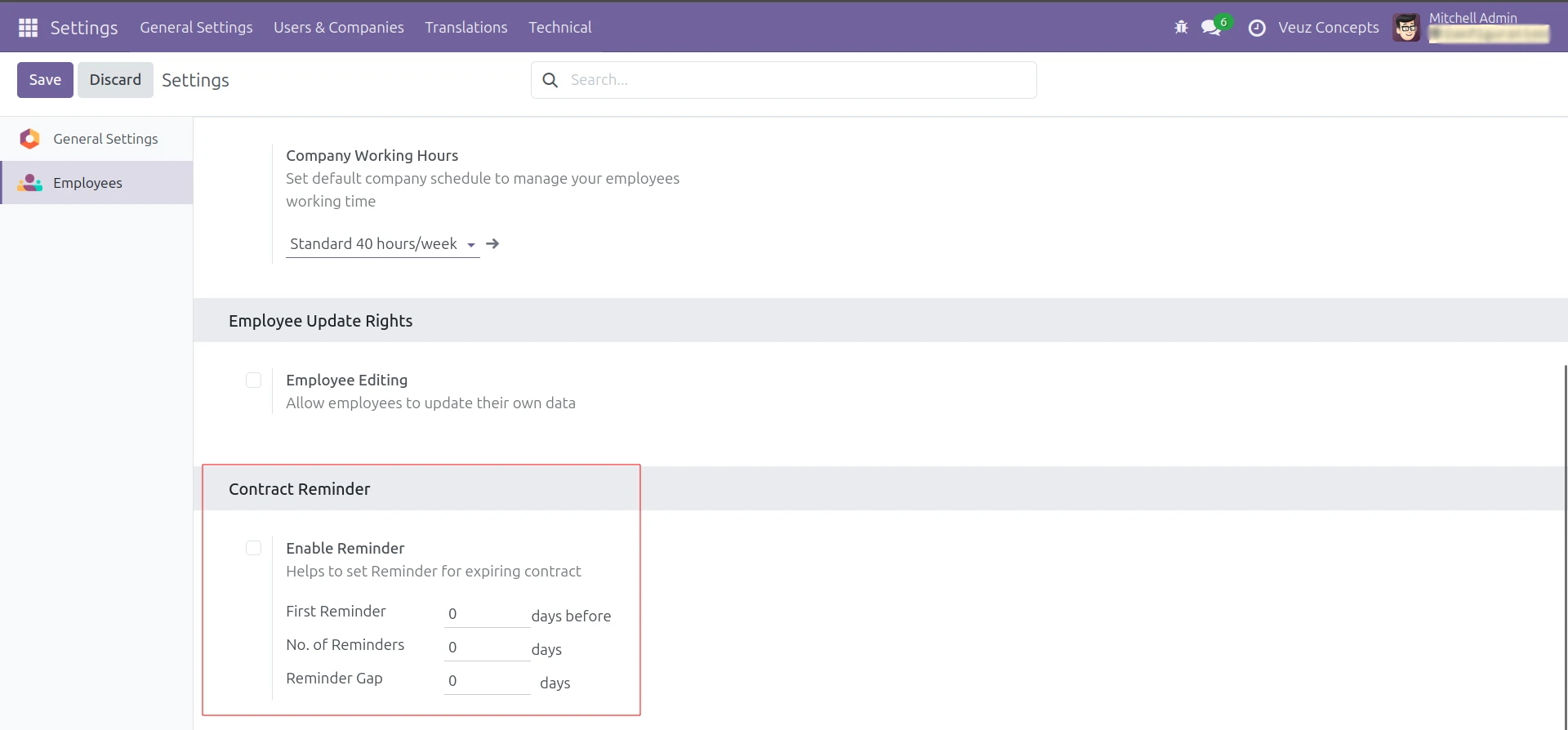
Now we can see the added fields have come in the Settings of Employee.







Leave a comment