

Odoo 18 is the latest release of the powerful open-source ERP platform. Running it on Ubuntu 24.04 provides a robust, secure, and up-to-date environment for both development and production setups. This guide walks you through the steps to install and configure Odoo 18 on a fresh Ubuntu 24 server.
Step-by-Step Installation
1️. Connect to Your Server via SSH
Begin by accessing your Ubuntu server using SSH, but only if you're configuring a cloud server—not when working on localhost:
ssh username@your_server_ip -p your_port
2️. Update the System
Make sure all packages are up to date:
sudo apt update
sudo apt upgrade
3️. Install Python and Dependencies
sudo apt install build-essential wget git python3-pip python3-dev python3-venv python3-wheel
python3 libfreetype6-dev libxml2-dev libzip-dev libsasl2-dev python3-setuptools libjpeg-dev
zlib1g-dev libpq-dev libxslt1-dev libldap2-dev libtiff5-dev libopenjp2-7-dev -y
4️. Install Node.js, NPM, and CSS Preprocessors
Odoo’s web interface requires LESS and CSS plugins:
sudo apt install npm -y
npm install -g less less-plugin-clean-css
sudo apt install node-less -y
5️. Install Wkhtmltopdf
Wkhtmltopdf is essential for PDF generation (e.g., reports and invoices):
sudo apt install wkhtmltopdf -y
sudo ln -s /usr/local/bin/wkhtmltopdf /usr/bin
6️. Install and Configure PostgreSQL
Odoo uses PostgreSQL as its database backend:
sudo apt install postgresql -y
sudo systemctl start postgresql
sudo systemctl enable postgresql
7️. Create Odoo System User and Database User
Set up a dedicated system user and database role for Odoo—this is required only when configuring a cloud server, not when working on localhost:
sudo adduser --system --home /opt/odoo18 --group --shell /bin/bash odoo18
sudo su - postgres -c "createuser -s odoo18"
8️. Download and Set Up Odoo
Switch to the odoo18 user and clone odoo18 Repository:
su - odoo18
git clone https://www.github.com/odoo/odoo --depth 1 --branch 18.0 /opt/odoo18/odoo18
Create a Python virtual environment and install dependencies:
python3.12 -m venv odoo18-venv
source odoo18-venv/bin/activate
pip install --upgrade pip
pip install wheel
pip install -r odoo18/requirements.txt
exit
9️. Setup Custom Addons & Log Directory
Create directories for custom modules and logging:
sudo mkdir /opt/odoo18/odoo18-custom-addons
sudo chown -R odoo18:odoo18 /opt/odoo18/odoo18-custom-addons
10. Create Odoo Configuration File
Create and configure /etc/odoo18.conf:
sudo nano /etc/odoo18.conf

[options]
admin_passwd = StrongPasswordHere
db_host = False
db_port = False
db_user = odoo18
db_password = False
xmlrpc_port = 8069
logfile = /var/log/odoo18/odoo18.log
addons_path = /opt/odoo18/odoo18/addons,/opt/odoo18/odoo18-custom-addons
1️1. Create Systemd Service for Odoo
Create the systemd service file for Odoo:
sudo nano /etc/systemd/system/odoo18.service
Paste the following content:
[Unit]
Description=Odoo 18 ERP Service
After=network.target postgresql.service

[Service]
Type=simple
User=odoo18
Group=odoo18
ExecStart=/opt/odoo18/odoo18-venv/bin/python3 /opt/odoo18/odoo18/odoo-bin -c /etc/odoo18.conf
StandardOutput=journal+console
SyslogIdentifier=odoo18
PermissionsStartOnly=true

[Install]
WantedBy=multi-user.target
12️. Start and Enable Odoo Service
Finally, start and enable the Odoo service:
sudo systemctl daemon-reexec
sudo systemctl start odoo18
sudo systemctl enable odoo18
To check the status:
sudo systemctl status odoo18
Access Odoo from Your Browser
Open your browser and go to:
http://<your_server_ip>:8069
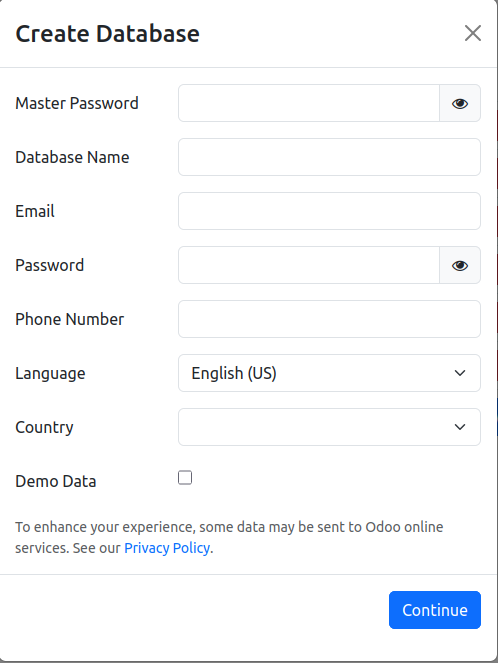
You’re All Set !
Odoo 18 has been successfully deployed on your Ubuntu 24.04 server. You can start configuring your ERP modules and customize it for your business needs.










Leave a comment