

Ever wondered who gets to see what's in your Odoo database and how Odoo magically keeps things in order? Well, it’s not magic,it’s Security Groups, Users, and Access Rights!
In Odoo 18, managing who can click what (and who absolutely shouldn’t) is easier, smarter, and more powerful than ever. Whether you’re the all-powerful admin or just trying to stop Bob from deleting all the sales orders again , this guide will help you understand how Odoo keeps your data safe and your team in line.
Lets understand this with the help of a custom module in Odoo 18. We can use a mode office document.
The below code shows an example of a model office.document and some basic fields.
from odoo import models, fields, api
class OfficeDocument(models.Model):
    _name = "office.document"
    _description = "Office Document"
    _order = "create_date desc"

    name = fields.Char(string="Title", required=True)
    description = fields.Text(string="Description")
    document_type = fields.Selection([
        ('policy', 'Policy'),
        ('report', 'Report'),
        ('notice', 'Notice'),
        ('document', 'General Document'),
    ], string="Type", default='document')
    upload_date = fields.Datetime(string="Uploaded On", default=fields.Datetime.now)
    uploaded_by = fields.Many2one('res.users', string="Uploaded By", default=lambda self: self.env.user)
    attachment_ids = fields.Many2many('ir.attachment', string="Attachments"
To set up access permissions, create a security folder inside your custom module. Within this folder, add a file named ir.model.access.csv. This file is used to specify which users or groups have permission to read, write, create, or delete records for your model.
id,name,model_id:id,group_id:id,perm_read,perm_write,perm_create,perm_unlink
doc_user_access,office.document user access,model_office_document,base.group_user,1,1,1,1
- id - This is the unique identifier for each access rule. It helps Odoo recognize and manage the specific record.
- name - A name/label for the access rule.
- model_id/id - Refers the model that the access rule controls.
- group_id/id - Tells Odoo which user group this rule is for. If you leave it empty, the rule applies to everyone in the system.
- perm_read, perm_write, perm_create, perm_unlink - These decide what users in that group can do with the records:
- perm_read - Lets them view the records.
- perm_write - Lets them update or edit existing records.
- perm_create - Lets them add new records.
- perm_unlink - Lets them delete records they have access to.
Now to restrict access for office.document to specific users lets create security groups . To do that you have to create a new security group in an XML file , which will be under the security file in your module.
<record id="group_document_manager" model="res.groups">
        <field name="name">Document Manager</field>
        <field name="category_id" ref="base.module_category_administration"/>
    </record>

    <record id="group_document_user" model="res.groups">
        <field name="name">Document User</field>
        <field name="category_id" ref="base.module_category_administration"/>
    </record>
This code creates 2 new groups Document Manager and Document User . After creating groups check in Groups menu in Settings.

Here we can see both the given groups in the group menu.
Now update the ir.model.access.csv file to assign access for office.document model to Document Manager group.
id,name,model_id:id,group_id:id,perm_read,perm_write,perm_create,perm_unlink
doc_manager_access,office.document manager access,model_office_document,group_document_manager,1,1,1,1
doc_user_access,office.document user access,model_office_document,group_document_user,1,1,1,0
Earlier all the users will have access to Office Document models , but now only the users which has the given groups will have access to this model office.document.
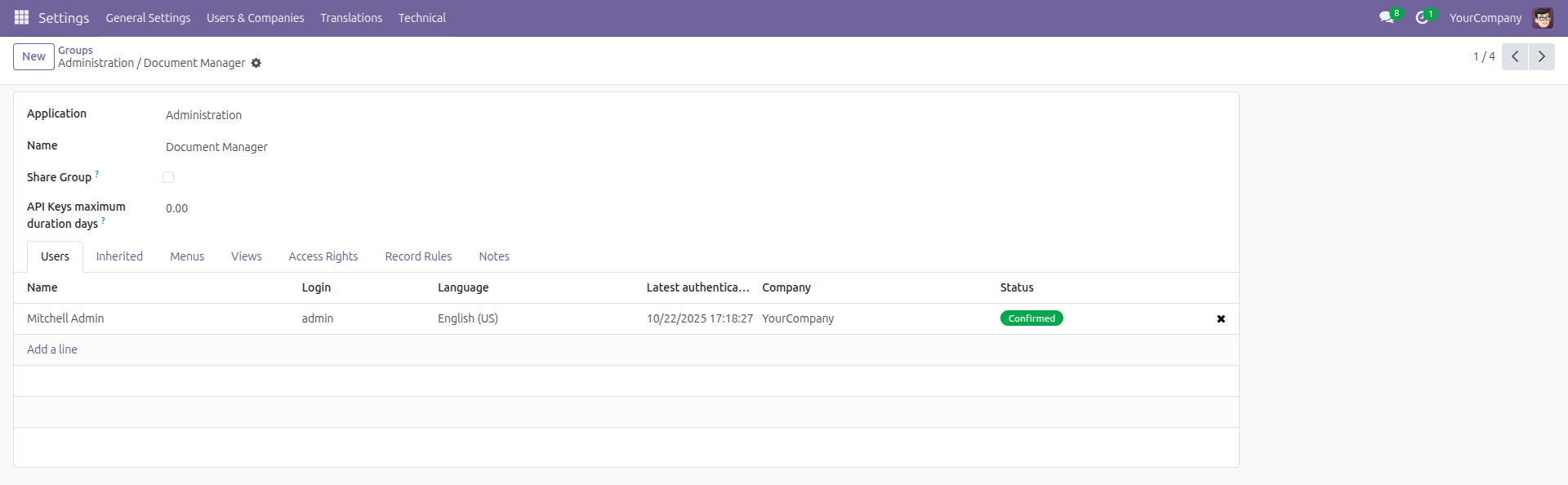
Here Mitchell Admin is given the access to Document Manager Group
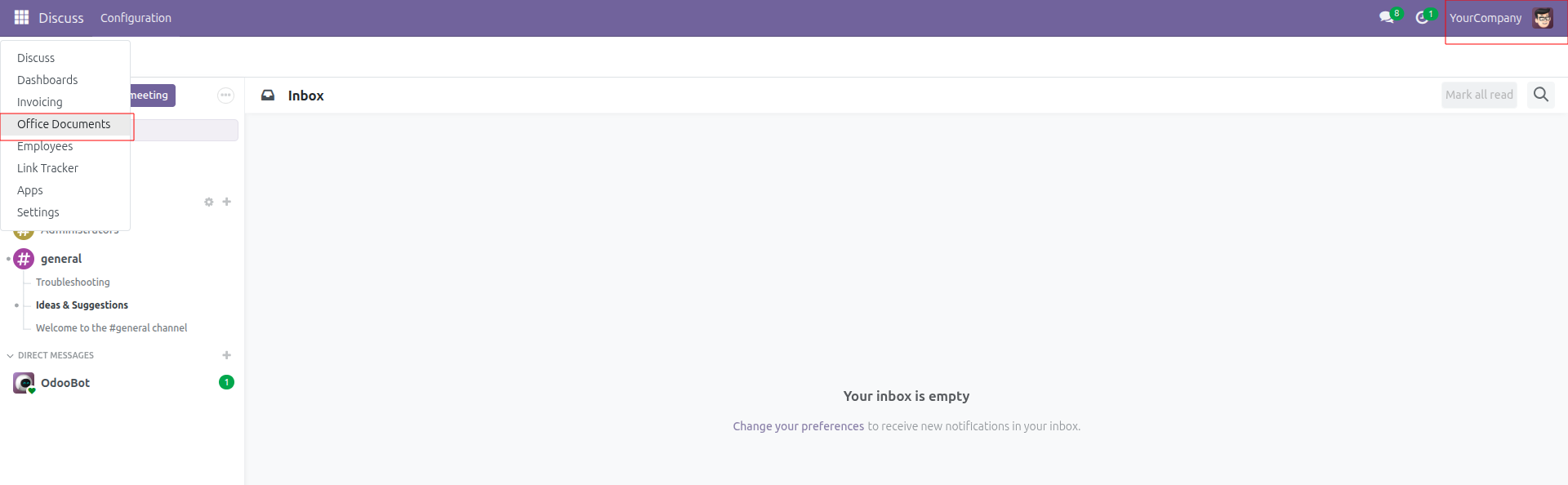
Here we can see now Mitchell Admin can view the Office Documents model, whereas the users without this group will not be able to see this menu / model.
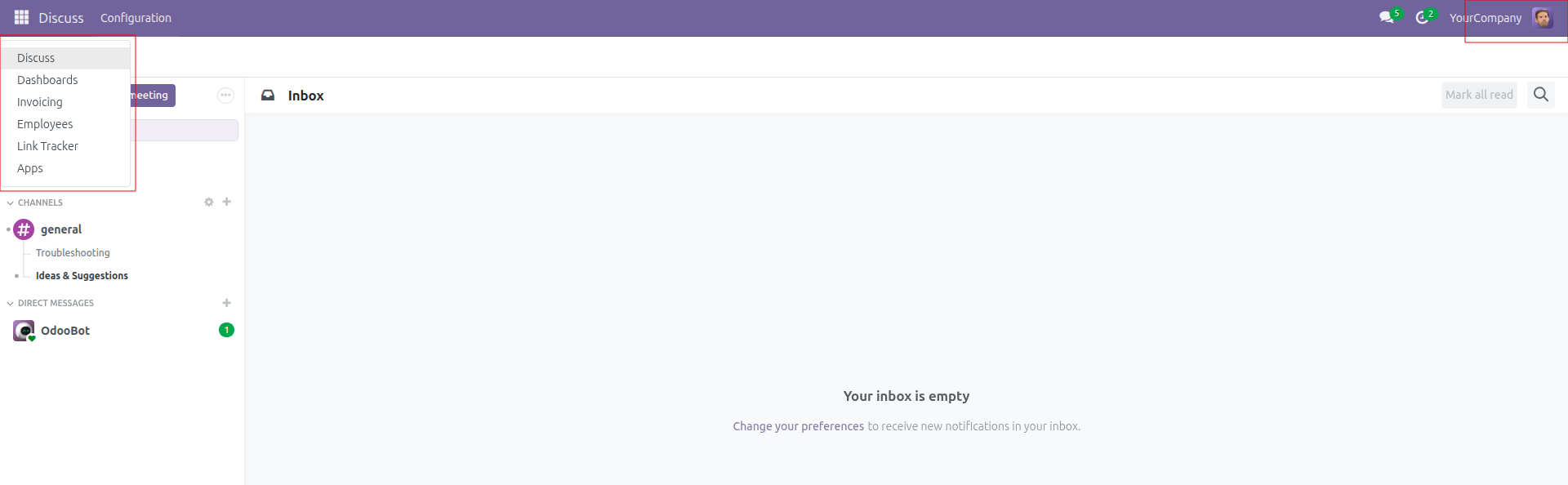
Here for Marc Demo the Office Document menu is not visible because that user doesn’t have any groups of Office Documents.
Record Rules - The Next Layer of Security!
We now know how to lock doors to each modules using Security Groups and Access Rights , only the right person can enter the Office Document Module.
But imagine if we don’t want regular employees to see Documents uploaded by managers, senior staff, or even other regular employees, while the managers should be able to view everyone’s document.
That’s where Record Rules come in handy!
If Access Rights decides what you can do (read, write, create, delete), then Record Rules decide which records you can do it to. This is filters of Odoo security.
Let’s add Record Rules to our office.document model and see how they work in action.
<record id="rule_document_user_own_docs" model="ir.rule">
        <field name="name">Document User: see only own documents</field>
        <field name="model_id" ref="model_office_document"/>
        <field name="groups" eval="[(4, ref('group_document_user'))]"/>
        <field name="domain_force">[('uploaded_by', '=', user.id)]</field>
        <field name="perm_create" eval="1"/>
        <field name="perm_write" eval="1"/>
        <field name="perm_unlink" eval="0"/>
        <field name="perm_read" eval="1"/>
</record>
Here we have made a demo rule to restrict users to see only their own documents, that is documents created by them . The “name” field is just a label/description of that rule.
The “domain_force” is a filter defined as domain . Basically, it forces Odoo to only show records that match the domain. With the domain [('uploaded_by', '=', user.id)] documents that has uploaded_by user as current user will be able to see those records .
The “group” field is what defines which group this rule is applied , here the group is set as “group_document_user” so the users with this group would only be able to see their own documents and the managers can see all the documents for now.
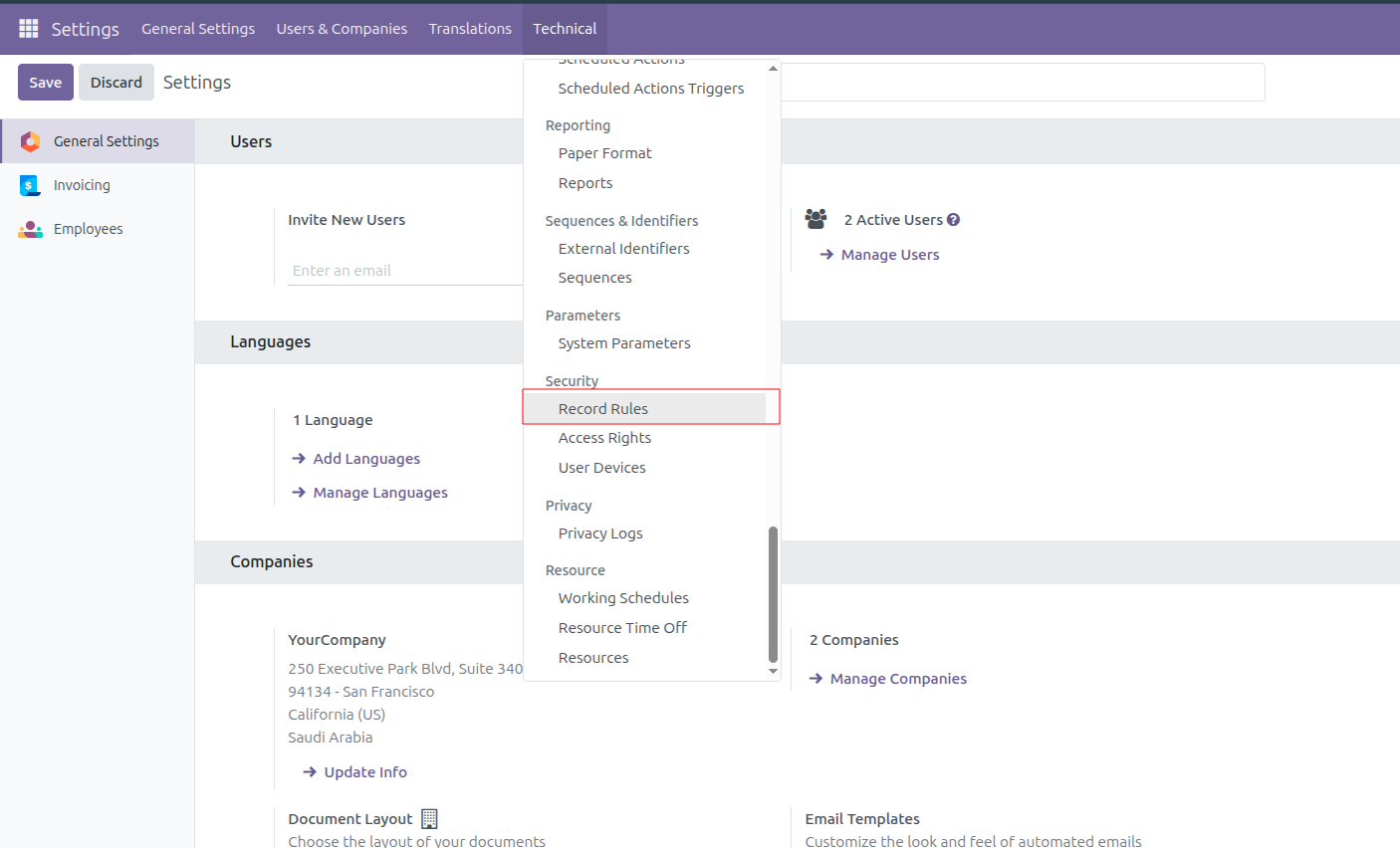
Once the record rule is written we can check it in Technical => Record Rules
Here I made Marc as the Document User and Mitchell as Manager.
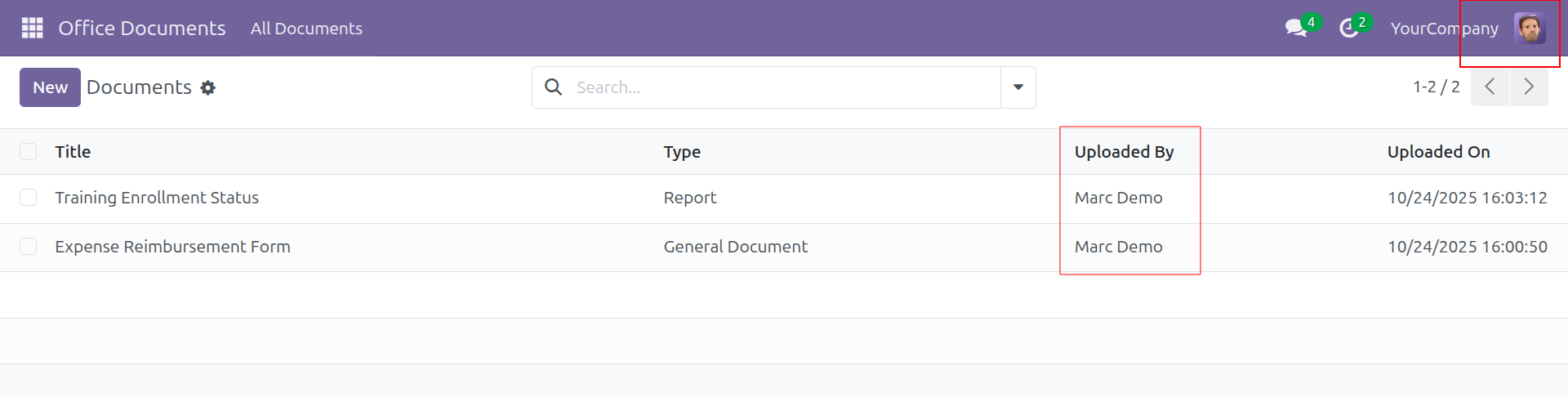
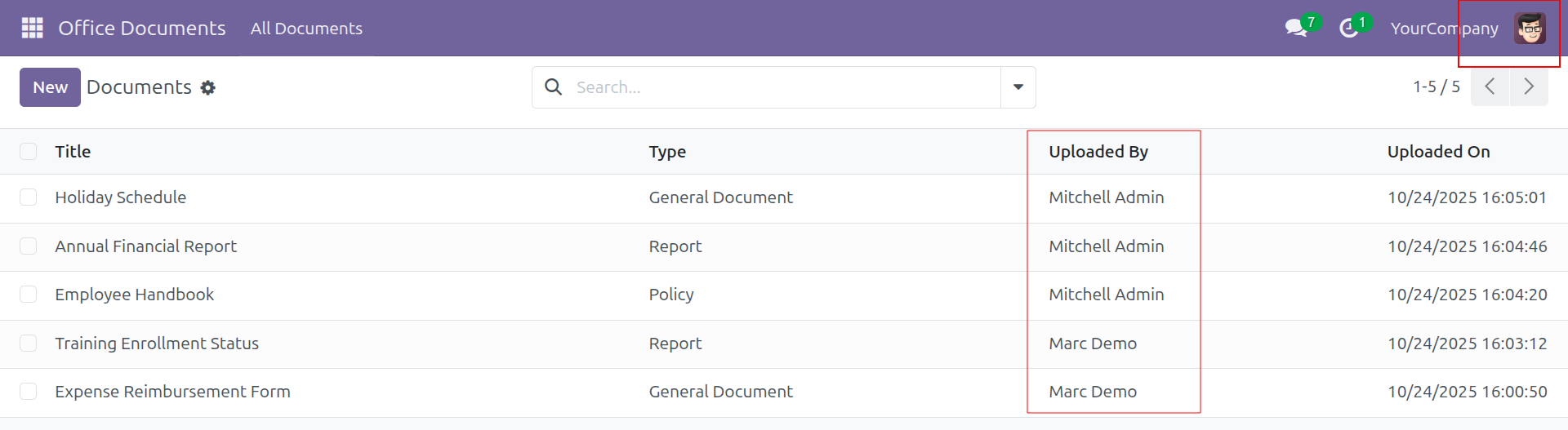
Here as we can see Marc is only able to see his own documents whereas Mitchell is able to see documents of everyone.
Building Smarter, Safer Workflows
In Odoo 18, security isn’t just a technical feature but it’s a framework that helps you create a structured, transparent, and controlled working environment. By combining Security Groups, Access Rights, and Record Rules, it is possible for you to define with ease on who can enter, what they can do, and which specific records they can work with.
From preventing the occurrence of accidental data tampering, to sensitive documents that need to stay visible so that only the right users can see and access them, these layers work together to build a strong security backbone for your custom modules.
Mastering these configurations, whether you work with a small team or a complex organization, will keep your Odoo instance safe, efficient, and fully aligned with your business needs.
So, if you are looking to set up seamless, secure, and reliable Odoo workflows, then start with Veuz Concepts. Being your reliable partner, we at Veuz help you implement those powerful features with precision and trust. Let's build smarter systems together.







Leave a comment