
-thumb.webp)
In today’s rapidly changing busuness world, managing financial document with precision and efficiency is essential.From creating invoices and updating them through credit or debit notes to processing vendor bills and managing retention amount,every step need to be accurate and well-organized. Odoo 18 offers an integrated solution that simplifies these process by providing automation, transparency and better control.This article explains how each of these financial documets functions in odoo 18 and how retention or witholding can be set up and maintained within the system.
1. Invoice in Odoo 18
An invoice (or customer invoice) represent the standard billing document issued to a customer for goods delivered or service performed. Within Odoo 18 ‘s invoicing & accounting app, you can create, post & track invoices.
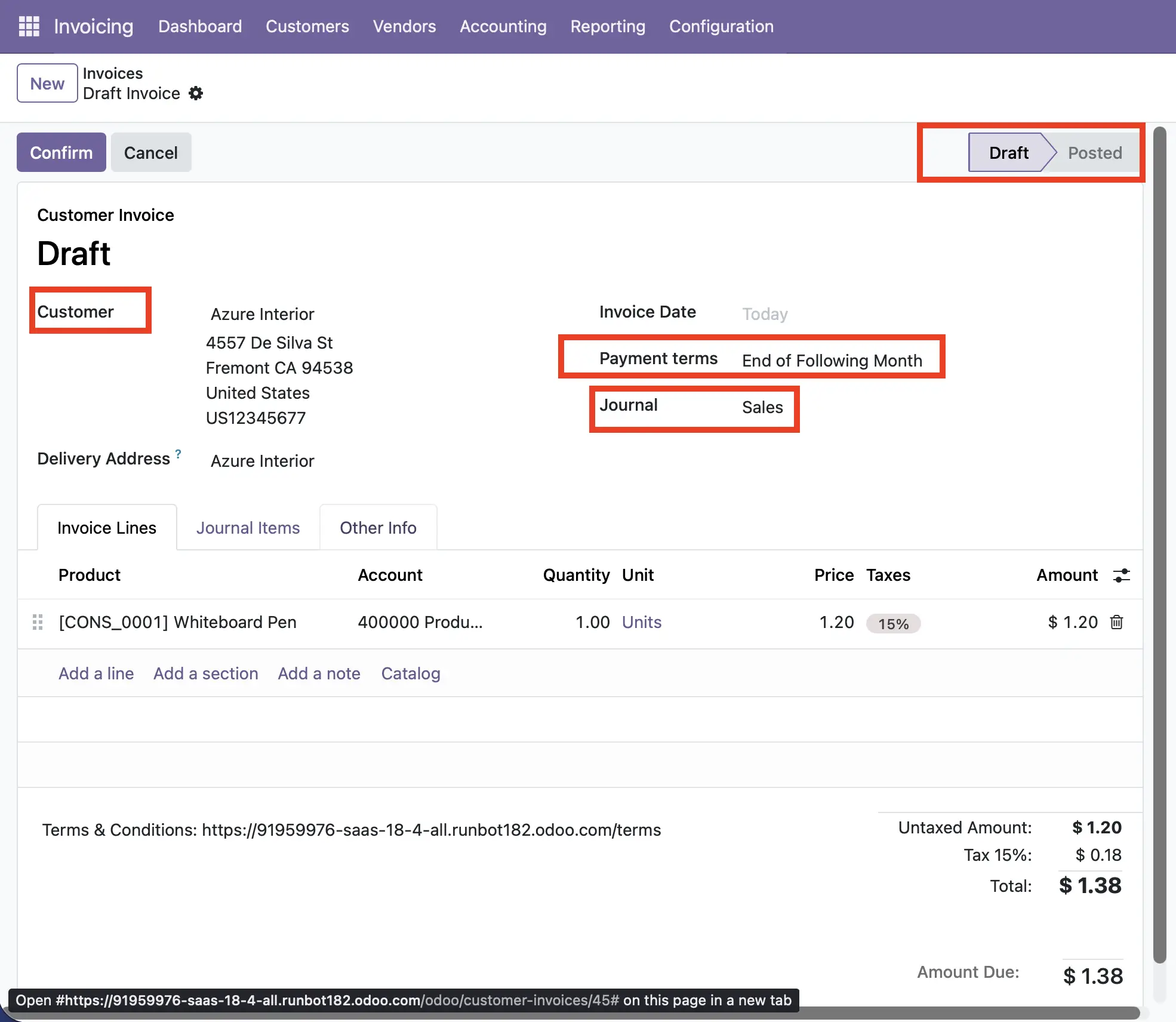
Key steps:
- Go to Accounting → Customer →Invoices, create a new draft invoice, fill in customer, lines, taxes, payment terms etc.
- Confirm the invoice to post it ,generating the corresponding journal entries.
- Monitor outstanding invoices via customer ledger and aged receivable report
Best practices:
- Ensure your product/service lines are correct (quantity,unit price,tax).
- Set up proper payment terms and due dates
- Ensure your numbering sequence are consistent.
By standardising invoice procedures in odoo 18, organisations can reduce errors, enhance cash-flow visibility and maintain audit-friendlly records.
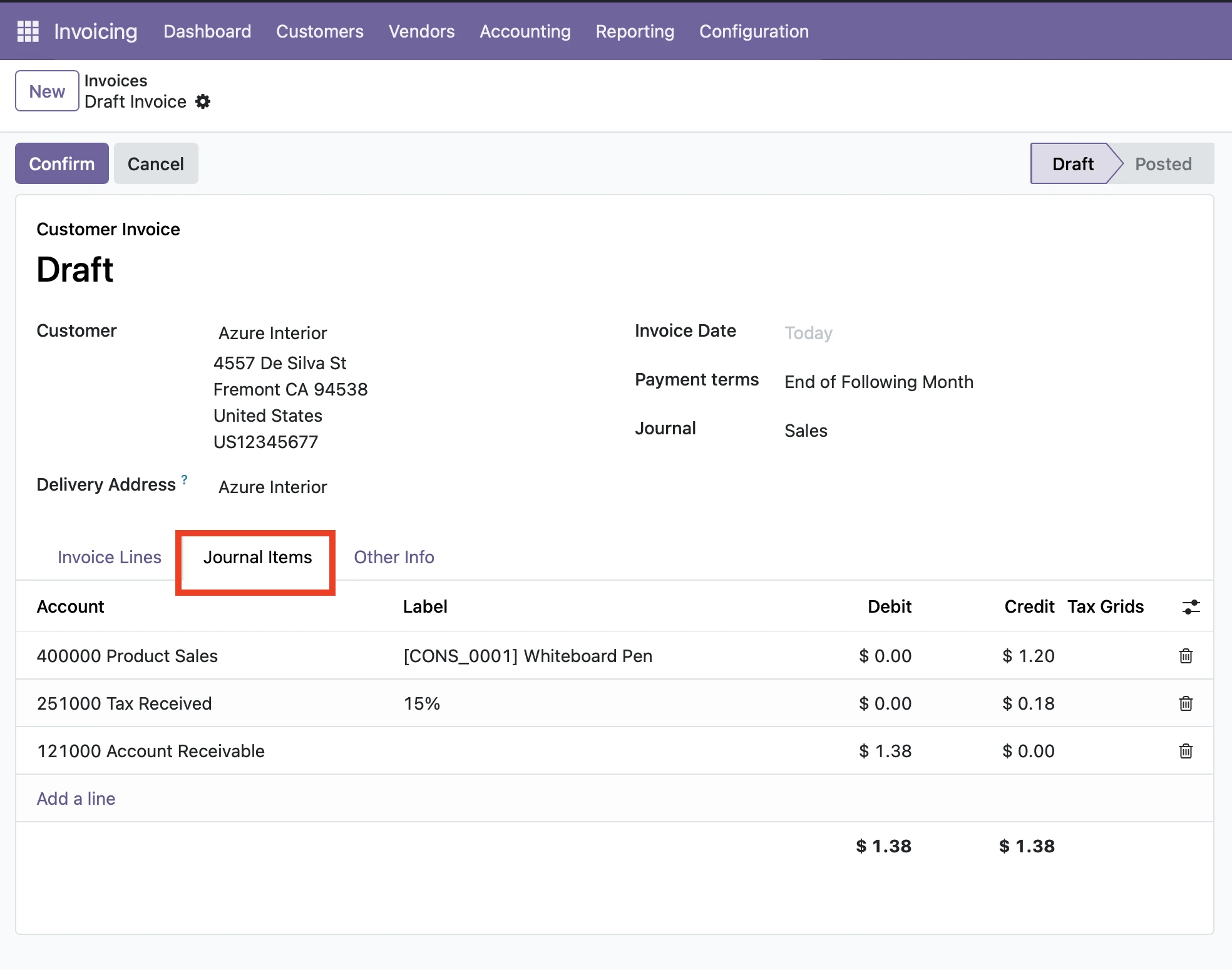
2.Credit notes: Correcting invoices
Sometimes,invoices need adjustments---may be a customer returns goods,services were partially delivered, or pricing needs correction.That’s where the credit note comes in.In Odoo 18, a credit note (also called refund document) is the correct accounting method for reversing or adjusting a posted invoice.
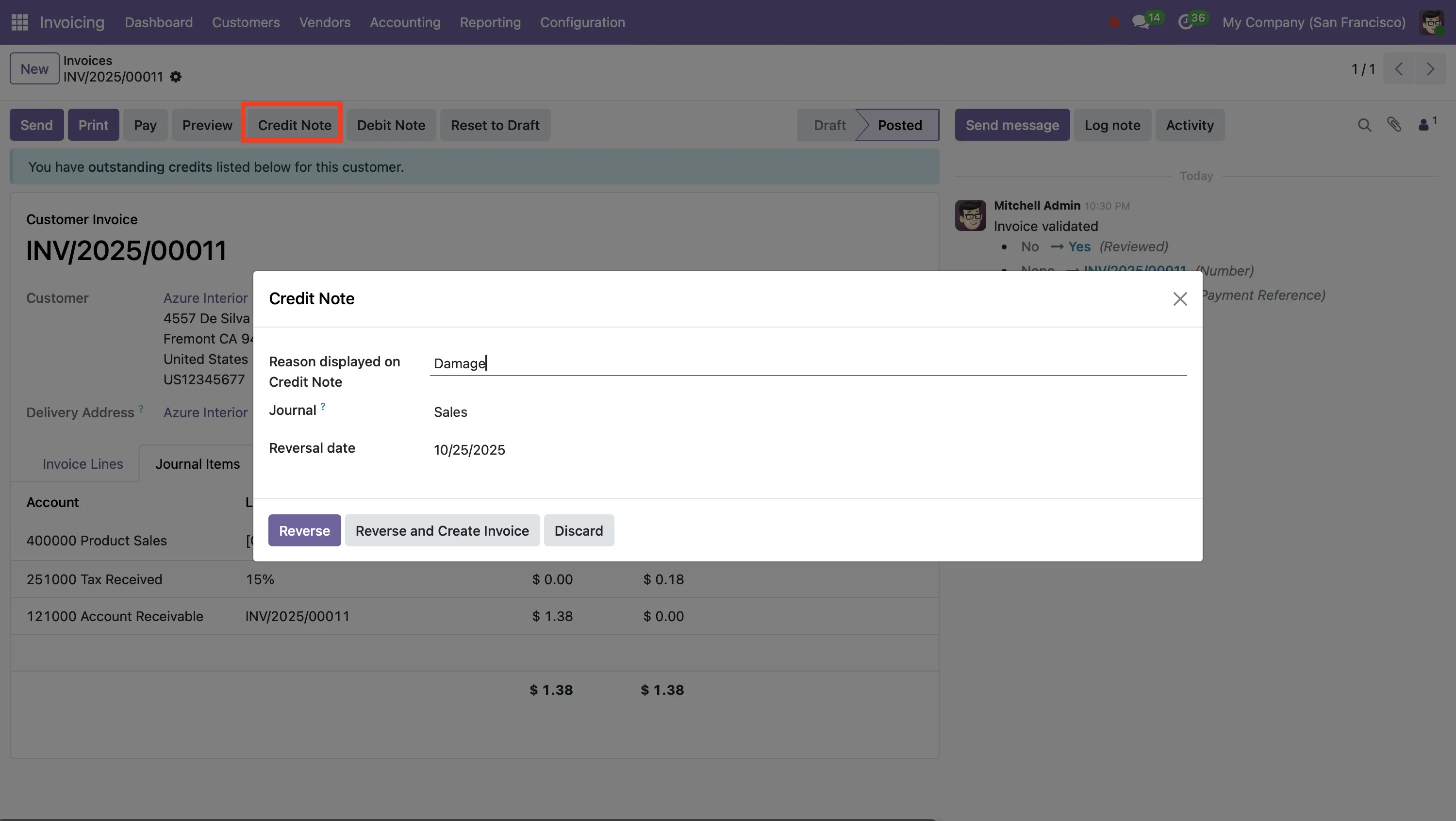
Key steps:
- Navigate to the original invoice, and select the Credit Note option. You will have the choice between Reverse (Simple cancellation), Reverse and create Invoice (which is a Correction / replacement), or create a credit note from scratch.
- After that, you will record the credit note reason (which is a mandatory field) and also the reversal date/journal.
- Finally, you will validate the credit note, and this will create journal entries that offset the original invoice;
- The original invoice will show as "reversed" and the credit note will show as posted.
Why is it important?
- It provides a clean audit trail; original invoice > credit note adjustment.
- It does not simply delete/post a record, it keeps an appropriate accounting treatment on the transaction.
- It allows for a refund for part of the invoice or cancel the entire invoice in one credit not
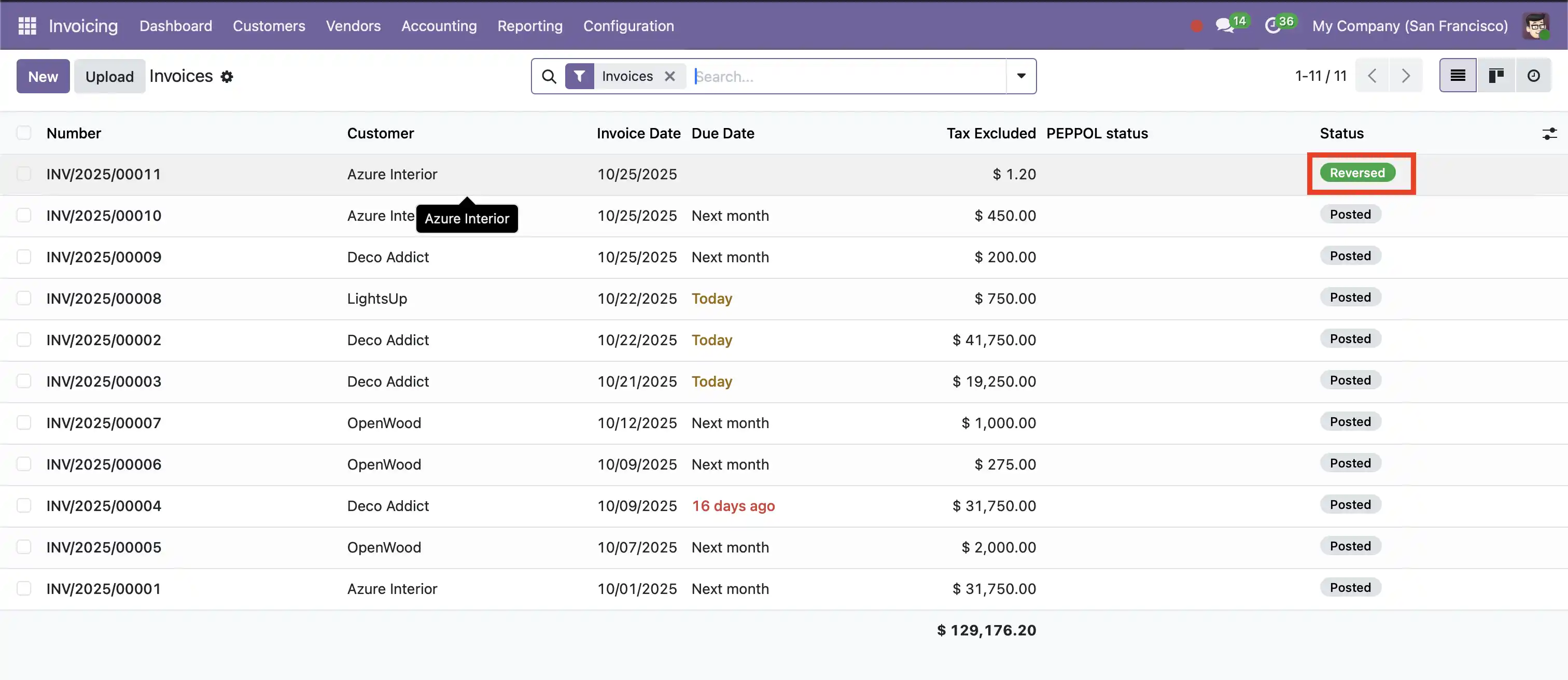
Credit Note sequences in Odoo will frequently begin with “RINV/...” to distinguish them from a normal invoice.
3. Vendor Bills
When it comes to purchasing, in Odoo 18 a bill of a vendor is the same as a vendor invoice.
It is the amount you owe the vendor for purchasing a good or service.
Standard Process:
- Accounting→ vendor→ Bill→ Create New →
- Provide vendor info, date, bill, and invoice lines (which include the product/service, quantity, price, and taxes).
- When you are ready, you will confirm (post) the bill; journal entries will be created automatically at this stage to establish the liability for the bill.
- When you pay the vendor (cash payment/later) you will register the payment; this process will reconcile and reverse the established liability
Best Practices:
- Bills should be matched to POs or the related Receipts whenever possible.
- Verify the tax and currency settings are correct (especially as it pertains to international suppliers).
- Use Aged Payables reports to track due dates and plan your cash flow appropriately.
4. Debit Notes: When your business owes more
Debit notes are not as common as invoices or credit notes but they can be important when your business needs to increase the amount owed by a customer (for example extra service delivered), or you as a vendor need to increase a supplier's bill (for example due to extra quantity or miscellaneous charges). In Odoo 18 debit notes are available on both the customer and vendor side.
Key Points:
- From a customer invoice: open the related invoice --> Create Debit Note.
- From vendor's bill: open the related bill --> Create Debit Note.
- The system generates the correct journal entries,adding to the customer’s liability or increasing your payable.
- Ensure accuracy when adjustments go in the other direction from credit notes.
5. Retention (Withholding & Hold-back)
Beyond standard documents, many industries and geographies require retention mechanisms — Withholding a portion of payment until certain conditions are met (for example, in construction contracts or service warranties). In Odoo 18, you’ll find capabilities around with holding/retention taxes (also called retention) as well as third-party modules that extend retention workflows significantly.
What is Retention?
Retention is a portion of payment withheld (by the customer/payer) until certain criteria are fulfilled (e.g, completion of service, warranty period, subcontractor release).It may be combined with tax withholding.
Example flow:
- A sale order will be created with 5 % retention applicable.
- Generate the invoice; system adds a negative “retention line” reducing immediate payable amount.
- When the retention release date (e.g. after the warranty period has expired) comes you create/issue a retention-release invoice/bill and reconcile and settle the amount.
- If you wish, retention can also be separately captured in a liability account, for visibility.
6. Benefits of an integrated odoo ERP for these financial documents
- Streamlined flow: All documents (customer invoices, credit/debit notes, vendor bills and retention items) processed in one system minimizing data duplication and risk of error.
- Auditable trail: All adjustments (credit/debit) being associated with the original document are easily identifiable.
- Real-time insight: You can see outstanding invoices, pending credit notes, retention liabilities, and vendor bill statuses
- Compliance readiness: With correct configurations (taxes, journals, sequences) you meet local accounting and tax-reporting obligations.
- Process efficiency: Automation removes manual entry; workflow ensure that correction, refunds, withholdings are handled systematically











Leave a comment